MacBook 12 Audio on Arch Linux
Last updated on March 27, 2026Running Arch Linux on the MacBook (Retina, 12-inch, 2017) works surprisingly well, but audio has been historically problematic. The MacBook 12" (2016/2017) uses a Cirrus Logic CS4208 audio codec that the Linux kernel driver does not properly initialize on cold boot.
This article documents how I fixed the audio on my 2017 model. The same procedure should work for the 2016 model, since both use the same CS4208 hardware.
Verify the MacBook model and the audio codec
Before attempting to install any driver, verify the MacBook model:
$ sudo dmidecode | grep -A5 "System Information"
System Information
	Manufacturer: Apple Inc.
	Product Name: MacBook10,1
	Version: 1.0
	Serial Number: C02V11KHHH25
	UUID: e903d1a5-8519-5dc4-bfb3-0990d2833e15
A MacBook 10,1 or MacBook 9,1 is required, this method does not work on the MacBook 8,1 (Retina, 12-inch, 2015).
Then, verify the audio codec:
$ lspci -nn | grep -i audio
00:1f.3 Audio device [0403]: Intel Corporation Sunrise Point-LP HD Audio [8086:9d71] (rev 21)
The boot chime is critical
Before installing any driver, understand this requirement:
If there is no boot chime, there will be no sound in Linux.
When the MacBook is powered on, the firmware must initialize the audio hardware. If the codec is not powered and configured by the firmware, the Linux driver cannot recover it.
On macOS, the boot chime can be enabled by setting an NVRAM variable:
sudo nvram StartupMute=%00
If there is no dual boot with macOS, alternatively, boot into macOS Recovery (Command + R at startup), open Terminal, and run the same command.
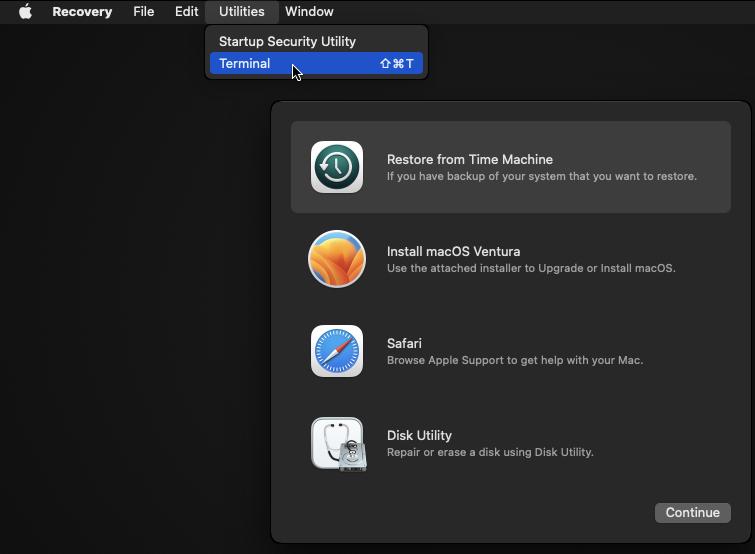
After setting it, shut down completely and power on again. Now, the chime must sound.
If the chime still does not appear, your firmware is likely outdated. The only reliable fix is to install macOS on an external USB drive, boot it fully at least once (allowing the firmware to update silently), then return to Linux. This is the step that made the difference for me.
Installing the audio driver
Once the boot chime works reliably, install this community-maintained driver forked by @juicecultus on GitHub. The original work was developed by @leifliddy but the project is likely abandoned and it does not compile on modern Linux Kernels.
https://github.com/juicecultus/macbook12-audio-driver
This driver specifically targets the CS4208 implementation and must be installed as a DKMS module. DKMS (Dynamic Kernel Module Support) means the driver automatically rebuilds when the kernel upgrades—essential for rolling distributions like Arch Linux. Without it, every kernel update would break audio.
DKMS installation steps
Clone the repository:
git clone https://github.com/juicecultus/macbook12-audio-driver.git
cd macbook12-audio-driver
Then, build the driver using DKMS:
sudo ./install.cirrus.driver.sh -i
This will:
- Download the matching kernel source from kernel.org.
- Extract and patch the HDA codec source.
- Build the snd-hda-codec-cs420x module.
- Register it with DKMS for automatic rebuilds on kernel updates. When you upgrade the kernel using pacman, the module will be automatically updated for newer kernel versions.
Verify after reboot
After rebooting, verify that the CS4208 driver loaded successfully:
$ lsmod | grep snd_hda_codec_cs420x
snd_hda_codec_cs420x   131072  1
snd_hda_codec_generic   126976  1 snd_hda_codec_cs420x
snd_hda_codec         233472  7 snd_hda_codec_generic,snd_soc_avs,snd_hda_codec_hdmi,snd_soc_hda_codec,snd_hda_codec_cs420x,snd_hda_intel,snd_hda_codec_intelhdmi
snd_hda_core          155648  9 snd_hda_codec_generic,snd_soc_avs,snd_hda_codec_hdmi,snd_soc_hda_codec,snd_hda_codec_cs420x,snd_hda_intel,snd_hda_ext_core,snd_hda_codec,snd_hda_codec_intelhdmi
Check the DKMS status:
$ dkms status
macbook12-audio/0.1, 6.19.10-1-cachyos, x86_64: installed (Original modules exist)
The tradeoff
Since enabling the chime and firmware initialization, boot time increased by roughly 10–15 seconds. The firmware now performs additional initialization phases. However, audio now works consistently on every cold boot, which makes the tradeoff worthwhile.